


Jump to Section
What Is a TIFF Image?
TIFF (Tagged Image File Format) is a flexible and widely supported image format used for storing high-quality graphics. Developed by Aldus Corporation (now Adobe), TIFF supports lossless compression, multiple layers, and various color depths, making it ideal for image archiving, professional photography, and publishing. It can store multiple images in a single file and retain image quality without degradation, which is especially useful for detailed images, such as scanned documents or medical imaging.
Browser Support for TIFF Images
Major web browsers like Chrome, Edge, and Firefox generally do not natively support TIFF images, requiring alternative solutions for display. While Safari can display TIFF files, it's not a universal solution for all browsers.
Why TIFF is not widely supported by browsers?
Complexity and variations
TIFF has numerous variations and specifications, making it challenging to implement and maintain consistent support across different browsers and platforms.
Maintenance costs
Adding support for a new image format requires significant development and ongoing maintenance, which may not be seen as worthwhile for TIFF given its relatively limited use in web contexts.
Security concerns
TIFF's complexity can also introduce potential security vulnerabilities that browser developers may want to avoid.
Alternative formats
JPEG and PNG are widely supported and provide adequate quality for most web-based images, making TIFF less essential.
Solutions for displaying TIFF images in browsers
Conversion
Convert TIFF images to a more widely supported format like JPEG or PNG before displaying them on the web. This can be done on the server-side or client-side using JavaScript libraries.
Browser extensions
Install a browser extension like Inline Tiff Viewer (for Chrome) that adds TIFF support.
Server-side processing
Implement a server-side component (e.g. using libraries like a well-known ImageSharp) that converts TIFF images to a format suitable for the browser on-the-fly.
JavaScript libraries
Use JavaScript libraries like Seikichi/tiff.js or UTIF.js to handle TIFF rendering within the browser.
IE Mode (for Edge)
If using Edge, you can enable IE Mode to display TIFF files, but this is not a recommended long-term solution.
TIFF images in Umbraco
Once the editor uploads a TIFF image in the Media section, it's recognized as an image. It works that way thanks to the default configuration as follows:
"Umbraco": {
  "CMS": {
    "Content": {
      "Imaging": {
        "ImageFileTypes": ["jpeg", "jpg", "gif", "bmp", "png", "tiff", "tif"],
      }
    }
  }
}
You can read more in the documentation: https://docs.umbraco.com/umbraco-cms/reference/configuration/contentsettings
Uploading TIFF images in the Umbraco CMS
We can upload TIFF images in Umbraco CMS.
TIFF image in this case is handled properly. I mean it's uploaded and stored without any issue.
However, the preview in the folder is not working as expected. The issue is not caused by any bug in the Umbraco CMS. Moreover, the built-in ImageSharp supports this format.
Essentially, it's related to the browser not supporting the format.
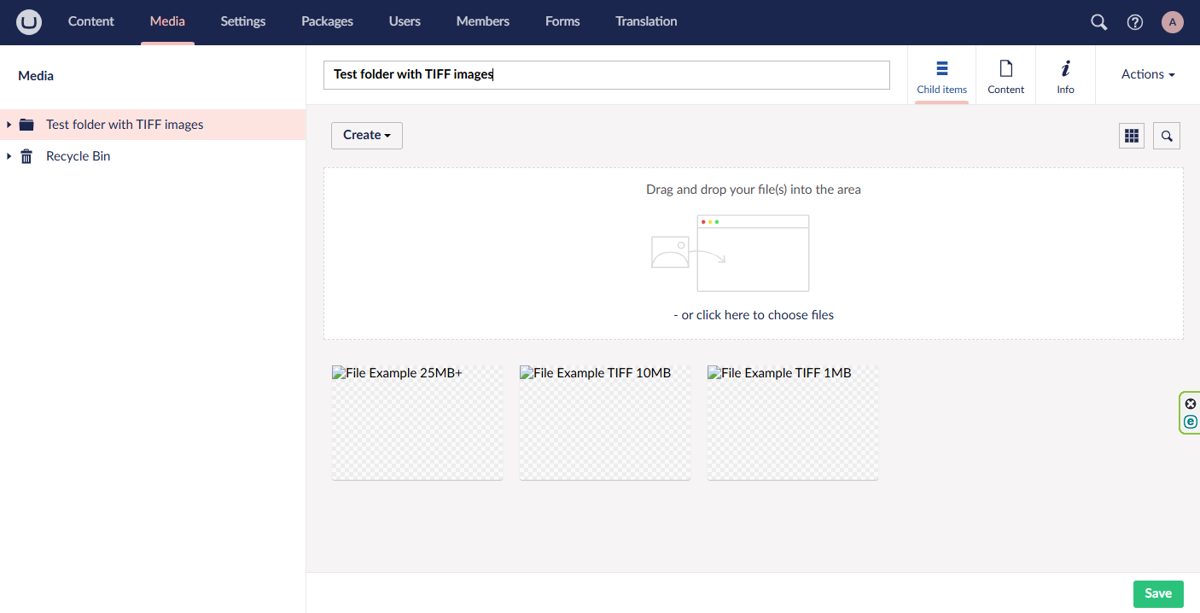
The preview of the image is not working in the edit mode either, as below:

You can perform similar tests in your project by obtaining some TIFF images through: https://file-examples.com/index.php/sample-images-download/sample-tiff-download/
TIFF images vs. ImageSharp
It's worth to mention that the built-in ImageSharp supports the TIFF format.
We can prove that by copying the URL of any uploaded image and applying a width parameter to the path this way:
/media/vdqg41bw/file_example_tiff_1mb.tiff?width=50Once the URL with parameter is being browsed a new file will be downloaded by the browser and you can open this image in your OS to confirm that it has been scaled as expected.
Out of the box ImageSharp supports the following image formats:
- Bmp
- Gif
- Jpeg
- Pbm
- Png
- Tiff
- Tga
- WebP
- Qoi
ImageSharp's API however, is designed to support extension by the registration of additional IImageFormat implementations.
Enforcing alternative format
You can also confirm that TIFF images are supported by the Umbraco CMS and ImageSharp by applying another parameter to the URL. I mean here the format parameter as follows:

Large TIFF image scaled to 800px and displayed in the browser as jpg.
Hidden dangers when TIFFs break everything
While ImageSharp technically supports TIFFs, we've encountered critical errors in real-world use:
1. An unhandled exception has occurred while executing the request:
System.NotSupportedException: Decoding Tiff images with ExtraSamples is not supported with UnspecifiedData.
2. System.ArgumentException: Parameter is not valid.
3. OutOfMemoryException - TIFF too large or complex
These issues can affect:
- Image processing pipelines
- Backoffice performance
- Frontend rendering if TIFFs are embedded directly
Conclusion on how to handle TIFFs in Umbraco
TIFF images are not being displayed as expected in the Umbraco backoffice and can cause some issues with stability of the system. Moreover, it could have some impact for website once embeded on any page.
Therefore, we recommend disallowing uploading TIFF images in the Umbraco CMS or at least not interpreting them as images. A dedicated media type can be also considered if the TIFF images are crucial in any project.
Finally, we are wondering if the default configuration of Umbraco Should be adjusted, so TIFF images will not be interpreted as images or not allowed at all.